Three dimensions
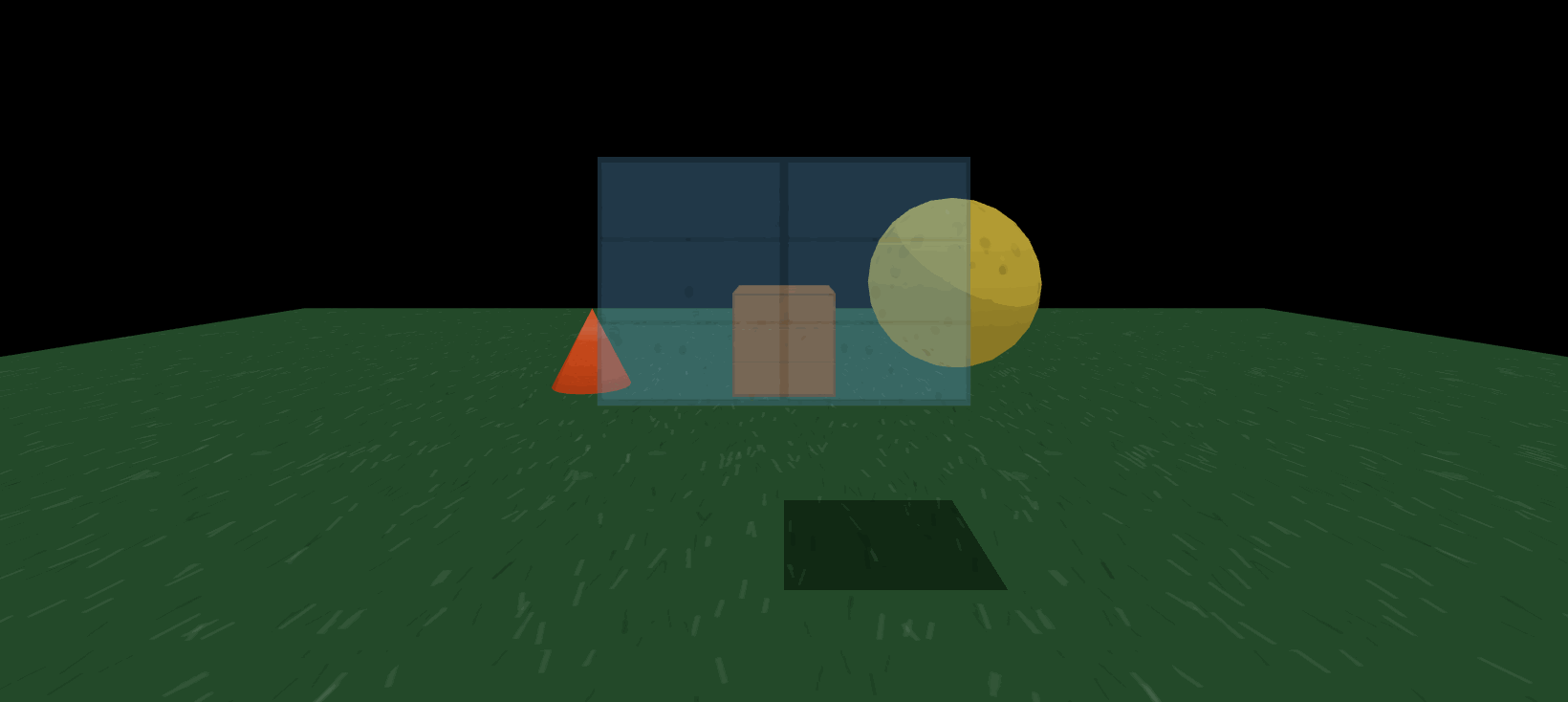 Drawn by hive.ui, in a window
type Msg { Tick }
func view(model: Int): hive.ui.View {
shapes := [
hive.ui.ground([hive.ui.paint(hive.ui.Tone.HEX("#2d5c34"))], 20.0, 20.0),
hive.ui.box(
[
hive.ui.at(0.0, 0.5, -3.0),
hive.ui.paint(hive.ui.Tone.HEX("#b5651d")),
hive.ui.surface(hive.ui.Surface.Planks()),
],
1.0, 1.0, 1.0,
),
hive.ui.sphere([hive.ui.at(2.0, 1.0, -4.0), hive.ui.paint(hive.ui.Tone.HEX("#e0c341"))], 1.0),
// A cone takes both radii: nought at the top is the pointed one.
hive.ui.cone(
[
hive.ui.at(-2.0, 0.4, -3.0),
hive.ui.paint(hive.ui.Tone.HEX("#ff5a1f")),
hive.ui.surface(hive.ui.Surface.Gloss()),
],
0.0, 0.4, 0.8,
),
// And a colour with an alpha is drawn see-through.
hive.ui.box(
[hive.ui.at(0.0, 1.2, -1.5), hive.ui.paint(hive.ui.Tone.RGBA(120, 200, 255, 96))],
3.0, 2.0, 0.2,
),
]
return hive.ui.scene(
[hive.ui.grow(1), hive.ui.eye(0.0, 1.6, 4.0), hive.ui.aim(0.0, 0.0), hive.ui.lens(70), hive.ui.fog(60)],
shapes,
)
}
proc update(model: mut Int, msg: Msg): Msg {
return msg
}
proc main(): void {
spawn(hive.ui.window("A 3D scene", view, update), 0)
}hive.ui.scene(attrs, shapes) is the one widget only a window can draw: a camera, a sky and a vector of shapes, rebuilt from the state by an ordinary func as often as there are frames. Nothing is a handle — no mesh to keep, no material to allocate — so a program says what is there now, never what changed. Its shapes are hive.ui calls like every other widget, and it is the one part of the library that carries a download: a pinned three.js, fetched on the first build that draws a scene and cached after that.
The shapes take their dimensions as their payload, in metres, because a sphere without a radius is not a sphere with a default one:
box(attrs, width, height, depth),sphere(attrs, radius),cylinder(attrs, radius, height), andcone(attrs, top, bottom, height)— a top of0is the pointed one, and a top equal to the bottom a cylinder.roof(attrs, wide, tall, long), a ridge down its length and a gable at each end;ground(attrs, width, depth), already lying flat.label(attrs, words), always facing the viewer;sprite(attrs, image, wide, tall), a picture from the program'sassets/that does the same, stands on its foot rather than its middle, is drawn unfiltered, and is left untinted unless painted.line(attrs, fromX, fromY, fromZ, toX, toY, toZ), which has no position of its own.
at(x, y, z) is where a shape's middle is. turn(x, y, z) is its rotation in radians as a heading: the yaw, y, first, then the pitch, x, about the shape's own side-to-side axis, then the roll, z, about its own length — so a thing turned to face somewhere and then pitched tips nose-up the way it faces. paint(Tone) is its colour, and a colour with an alpha — Tone.RGBA, or a four- or eight-digit Tone.HEX — is see-through.
surface(Surface) is what a shape is made of, drawn over its colour, from the ground up: Turf, Gravel, Tarmac, Kerb; Concrete, Brick, Panes, Planks, Staves; Bark, Leaves, Crowd; Mesh; and Speckle, Metal, Carbon, Rubber, Glass, Gloss. A finish repeats about every two metres, a box face by face; each has relief except Gloss, Glass and Mesh, which has real holes and shows from both sides; and Panes paints its own glass. Where a shape says nothing its kind decides — a ground is Turf, a cylinder or a cone Staves, a sphere Speckle, anything else Planks. A photograph at assets/textures/<surface>.jpg replaces a finish's drawing, with -normal.jpg beside it as its relief; it should average mid-grey, since it is laid over the colour, and a missing one falls back to the drawing.